
MJML Editor Online Free - Responsive Email Template Builder & Previewer 2026

Table of Contents
Online MJML Email Editor: The End of Email Coding Pain
If you have ever tried to code an HTML email from scratch, you know the struggle. Unlike modern web development, which uses CSS Grid and Flexbox, email clients (like Outlook, Gmail, and Yahoo) are stuck in the 90s. To make an email look good everywhere, developers are forced to use nested tables, inline CSS, and obscure hacks.
The Online MJML Email Editor on tools-online.app solves this problem permanently. MJML (Mailjet Markup Language) is a responsive email framework that acts as a translator. You write high-level, semantic code (similar to HTML5), and our engine compiles it into the messy, table-heavy HTML that email clients require.
- Outlook Compatible: Automatically handles VML and ghost tables so your emails don't break in Outlook 2016/2019.
- Responsive by Default: Columns stack automatically on mobile devices without writing complex media queries.
- Instant Feedback: See your changes in real-time without needing to send test emails to yourself constantly.
Whether you are building a weekly newsletter, a transactional receipt, or a product launch announcement, this tool ensures your emails look professional on every device.
Edit MJML Online: Step-by-Step Guide
Our platform is engineered to remove the friction of installing local MJML compilers. When you use this tool to edit MJML online, you interact with a clean, split-screen dashboard designed for productivity.
Here is a comprehensive breakdown of the workspace elements you will encounter:

- MJML Editor (Left Pane): This is where you write your code. The editor supports syntax highlighting for MJML tags like
<mj-section>,<mj-column>, and<mj-text>, helping you visualize the structure of your email. - Live Preview (Right Pane): To the right is the real-time compilation view. As you type, the tool converts your MJML into HTML5 and renders it instantly. This allows you to check padding, colors, and image alignment on the fly.
- Toolbar Actions:
- Share: Creates a unique link to your design, perfect for getting approval from a manager or client.
- Samples: Loads pre-built templates (like Newsletters or Receipts) to jumpstart your design.
- Export: The most critical button. It allows you to download the final
.htmlfile or copy the raw HTML code to paste into your Email Service Provider (ESP) like Mailchimp or SendGrid.
- Settings & AI (Bottom Left): Just like our HTML editor, you can customize your theme or access the AI Chat to help generate email copy or layout structures.
AI-Powered Email Template Generation
The MJML editor on tools-online.app includes an AI email template assistant that generates complete MJML code from natural language descriptions.
How to Use AI Generation
Step 1: Configure AI (one-time setup)
- Get your API key from AIML API
- Click "Settings" icon(located lower left) in any tools-online.app tool.
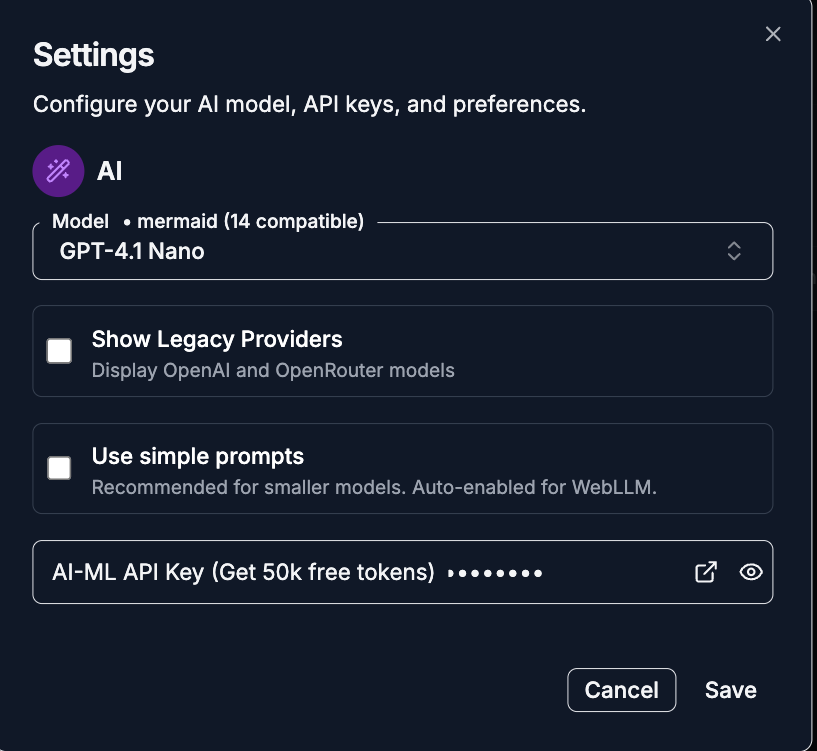
- Add API key and save.
.png)
Step 2: Open AI Chat
- Click the AI Chat button(located lower left)
.png)
- Choose "Generate" mode and provide a natural language description for the email template.
.png)
Example Prompts:
- For Layouts: "Generate an MJML structure for a monthly newsletter with a hero image, a two-column article section, and a footer with social links."
- For Copy: "Rewrite this intro paragraph to be more engaging for a Black Friday sale."
- For Styling: "Update the button colors to use my brand hex code #FF5733 and add more padding to the sections."
Basic MJML Email Template for Beginners
If you are new to MJML, starting with a clean slate is the best way to learn the syntax. This basic template includes the essential building blocks: a header, a main content area, and a simple call-to-action button.Click the link below to open code directly in our MJML editor and start customizing.
Try Basic MJML Email Template Online →
The template demonstrates the core concept of MJML: Rows (<mj-section>) contain Columns (<mj-column>), which contain Content (<mj-image>, <mj-text>, <mj-button>). It is lightweight and perfect for simple transactional emails like "Account Created" or "Password Reset."
Responsive Newsletter MJML Email Template
Newsletters are the lifeblood of email marketing. However, making a multi-column layout that looks good on both desktop and mobile is notoriously difficult with raw HTML. Click the link below to see the responsive stacking behavior in our MJML editor and start customizing.
Edit Newsletter MJML Template Online →
The template features a sophisticated layout with a hero image followed by a two-column text section. On desktop, the articles sit side-by-side. On mobile devices, the MJML engine automatically "stacks" them vertically, ensuring the text remains readable without the user needing to pinch-and-zoom. It handles the complex media queries for you.
Product Showcase MJML Email Template
For e-commerce brands, displaying products attractively is key to conversion. This template allows you to showcase items in a clean grid layout. Click the link below to load the grid layout in our MJML editor
Edit Product Showcase MJML Template Online →
The template uses the <mj-group> tag to keep prices and "Buy Now" buttons aligned perfectly. Unlike standard HTML tables where alignment often breaks in Outlook, this template ensures your product images and Call-to-Action (CTA) buttons remain consistent across all email clients. It is ideal for "New Arrival" announcements or "Flash Sale" emails.
Event Invitation MJML Email Template
Events require visual impact. This template focuses on a striking Hero image and clear typography to drive registrations.Click the link below to customize the event details in our online MJML editor.
Edit Event Invitation MJML Email Template Online →
The template utilizes the <mj-hero> component, which allows for background images with text overlaid on top. In standard HTML email coding, background images are notoriously difficult to get working in Outlook. MJML handles the VML injection automatically, ensuring your beautiful invitation looks just as good in Outlook 2019 as it does in Apple Mail.
Comparison: MJML Editor vs. Mailchimp vs. Raw HTML
Why should you choose the Online MJML Email Editor over other methods?
| Feature | MJML Editor (Tools-Online) | Mailchimp (Drag & Drop) | Raw HTML Coding |
| Control | High (Full code access) | Low (Restricted blocks) | Ultimate (But painful) |
| Speed | Fast (Reusable components) | Moderate | Slow (Manual tables) |
| Outlook Support | Excellent (Automated) | Good | Poor (Requires manual hacks) |
| Code Quality | Clean & Minified | Bloated | Depends on Developer |
| Cost | Free | Monthly Fees | Free |
| Learning Curve | Low (Semantic tags) | Very Low | High |
Verdict:
- Use Drag & Drop tools if you cannot code at all and don't mind generic designs.
- Use Raw HTML only if you are an expert email developer fixing a very specific edge case.
- Use the MJML Editor if you want professional, custom designs with the reliability of automated Outlook support and the speed of modern coding.
Related Web & Design Tools
The Online MJML Email Editor is part of a larger ecosystem of utilities on tools-online.app designed to support your entire creative workflow.
For Web Development
- HTML CSS JavaScript Editor: Once your email drives traffic to your site, use our frontend playground to prototype your landing pages.
- PHP Online Editor: Need to send emails dynamically? Test your PHP
mail()scripts or SMTP configurations in our secure sandbox.
For Comparison & Validation
- Text Compare Tool: Ensure your email copy is perfect. Compare your draft against the final version to catch subtle typos or missing links.
- Code Compare Tool: Tracking changes in your MJML templates? Use this tool to diff versions and see exactly what changed in your layout.
Essential Utilities
- Online Notepad: A quick place to draft your email subject lines, preheader text, and body copy using our AI assistant before pasting it into the editor.
For a complete list of recommended workflows, check out our guide on Top 9 Browser-Based Utilities for Daily Tasks.
Start Designing Emails
Stop fighting with HTML tables. Build responsive, Outlook-compatible email templates in minutes with our free online editor.