
PHP Online Editor - Run & Test PHP Code Instantly

Table of Contents
PHP Online Editor: Instant Backend Playground
Traditionally, learning or testing PHP (Hypertext Preprocessor) has been a headache. Unlike JavaScript, which runs natively in every browser, PHP is a server-side language. This meant that before you could write a single line of code, you had to install a local server environment like XAMPP, WAMP, or MAMP, configure ports, and manage local files. This setup process is a massive barrier for beginners and a time-sink for professionals who just want to test a quick function.
The PHP Online Editor on tools-online.app changes the game by leveraging WebAssembly (WASM).This tool allows us to run a full PHP environment directly inside your browser. There is no server round-trip, no latency, and no installation required.
- Execute Logic Instantly: Test complex array manipulations or string functions without waiting for a server reload.
- Prototype Full Stack: Uniquely, this tool allows you to combine PHP with HTML and CSS tabs, simulating a real dynamic webpage environment.
- Maintain Privacy: Since the PHP engine runs in your browser (Client-Side), your proprietary logic or sensitive data examples never leave your machine.
Whether you are debugging a WordPress snippet, learning backend logic, or testing a regex pattern, this tool provides a secure, zero-setup environment.
Edit PHP Online: Step-by-Step
Our platform is engineered to provide a robust coding experience that feels like a desktop IDE. When you use this tool to edit PHP online, you are interacting with a sophisticated dashboard designed for full-stack prototyping.
Here is a comprehensive breakdown of the workspace elements you will encounter:

The editor is divided into three distinct tabs, allowing you to separate your concerns just like in a real development project:
- PHP Tab: The core of the tool. This is where you write your backend logic (
<?php ... ?>). The screenshot shows it supports advanced scripting, including function definitions and error handling. - HTML Tab: Here you can define the static structure of your page. The PHP output is injected dynamically, allowing you to test how your backend logic interacts with frontend markup.
- CSS Tab: Apply styles to your output. This allows you to create visually complete prototypes, not just raw text outputs.
To the right is the visual output.
- WASM Execution: You might notice a status indicator like "PHP-WASM Status: Initializing...". This confirms that the PHP interpreter is loading directly into your browser's memory.
- HTML Rendering: Unlike simple compilers that only show text, this preview pane renders full HTML. If your PHP script outputs a
<table>or a styled<div>, it appears here exactly as it would on a live website.
The Console & Output Logs (Bottom Right)
Beneath the preview is the debugging suite.
- Console Tab: Captures system errors and logs. If your PHP script throws a fatal error or a syntax exception, it appears here.
- Compiled Tab: Shows the final HTML that resulted from your PHP execution. This is crucial for debugging why a certain element isn't displaying correctly.
The Action Toolbar (Top)
- Share: Generates a unique URL for your code snippet, making it easy to share solutions on StackOverflow or GitHub issues.
- Sample: Loads pre-built examples (like array filtering or form processing) to help you get started.
- Export: Download your code as a
.phpfile to move your work to a production server later.
Settings & AI Integration (Bottom Left)
- Settings (Gear Icon): Customize the editor theme and font size.
- AI Chat (Robot Icon): Access the integrated AI assistant to generate PHP functions, debug logic errors, or explain complex regex patterns.
AI-Powered PHP Code Generation
The PHP editor on tools-online.app includes an AI PHP assistant that generates complete PHP code from natural language descriptions.
How to Use AI Generation
Step 1: Configure AI (one-time setup)
- Get your API key from AIML API
- Click "Settings" icon(located lower left) in any tools-online.app tool.
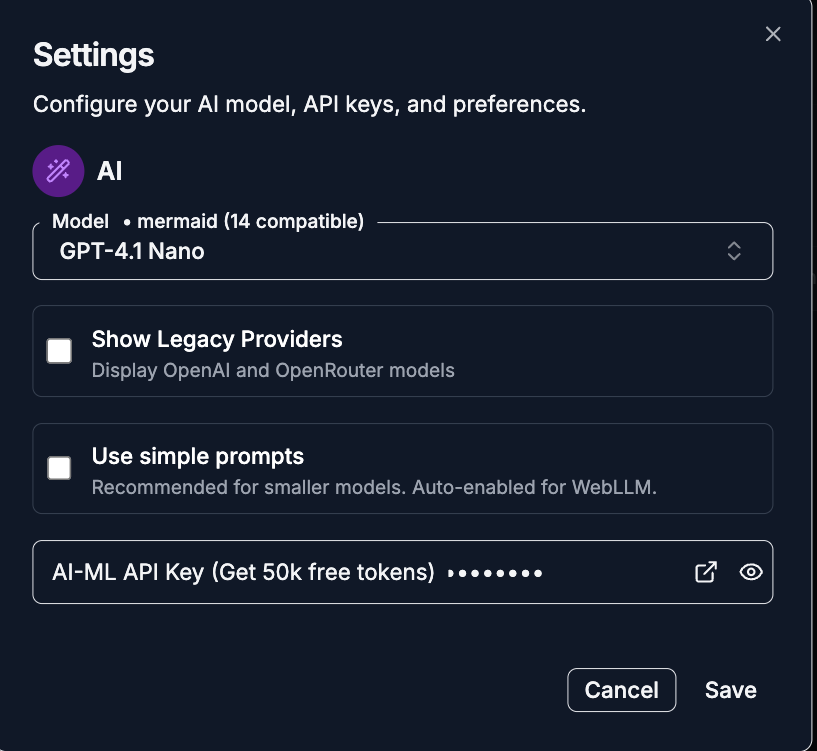
- Add API key and save.
.png)
Step 2: Open AI Chat
- Click the AI Chat button(located lower left)
.png)
- Choose "Generate" mode and provide a natural language description for the PHP code.
.png)
Example Prompts:
- For Algorithms: "Write a PHP function to sort a multi-dimensional array by a specific key."
- For Validation: "Generate a PHP script to validate user input from a contact form, ensuring the email is valid and the message is not empty."
- For Data Processing: "Create a script that parses a CSV string and converts it into a JSON object."
- For Debugging: Paste a snippet with an error and ask, "Why is this foreach loop causing an 'Undefined Index' warning?"
Best PHP Editor Online for Beginners
For those just starting with server-side programming, simplicity is key. A PHP editor online allows you to focus on the syntax and logic of the language without getting bogged down in server configuration files like php.ini.
Our PHP Online Editor is perfect for mastering the basics of variables, loops, and outputting data.
Popular Example: Dynamic Greeting and Date
Copy the code below into the PHP tab. This simple script demonstrates how PHP can inject dynamic data (like the current time) into a static page.
<?php
// 1. Define Variables
$userName = "Visitor";
$currentHour = date("H"); // Get current hour (00-23)
$greeting = "";

// 2. Logic Control Structure
if ($currentHour < 12) {
    $greeting = "Good Morning";
} elseif ($currentHour < 18) {
    $greeting = "Good Afternoon";
} else {
    $greeting = "Good Evening";
}

// 3. Define an Array of Tips
$tips = [
    "PHP runs on the server (or in WASM!)",
    "Always sanitize user inputs.",
    "Use meaningful variable names."
];
$randomTip = $tips[array_rand($tips)];
?>

<div class="welcome-box">
    <h1><?php echo "$greeting, $userName!"; ?></h1>
    <p>Current Server Time: <strong><?php echo date("Y-m-d H:i:s"); ?></strong></p>
    <hr>
    <p><em>Daily Tip: <?php echo $randomTip; ?></em></p>
</div>
Why this matters for beginners:
- Immediate Feedback: You see the result of
date()andechoinstantly. - Logic Visualization: Changing the system time or the
$currentHourvariable lets you test theif/elselogic immediately. - Array Handling: The
array_randfunction shows how easily PHP handles data structures.
PHP Sandbox with HTML and CSS Integration
One of the unique strengths of our PHP Online Editor is the ability to integrate backend logic with frontend styling. Most online compilers only show a black-and-white text terminal. We allow you to build beautiful, styled components.
Popular Example: Styled User Profile Card
Use the tabs to combine CSS styling with PHP data generation.
Step 1: The CSS (Paste in CSS Tab)
.profile-card {
    border: 1px solid #ddd;
    border-radius: 12px;
    padding: 20px;
    max-width: 300px;
    font-family: 'Arial', sans-serif;
    background: #f9f9f9;
    box-shadow: 0 4px 8px rgba(0,0,0,0.1);
    text-align: center;
}
.role-badge {
    background: #007bff;
    color: white;
    padding: 4px 8px;
    border-radius: 4px;
    font-size: 0.8rem;
    text-transform: uppercase;
}
.active { background: #28a745; }
.inactive { background: #dc3545; }
Step 2: The PHP Logic (Paste in PHP Tab)
<?php
// Simulate User Data from a Database
$user = [
    'name' => 'Alex Dev',
    'email' => 'alex@example.com',
    'role' => 'Admin',
    'isActive' => true
];

// Determine badge color class based on status
$statusClass = $user['isActive'] ? 'active' : 'inactive';
$statusText = $user['isActive'] ? 'Online' : 'Offline';
?>

<div class="profile-card">
    <h2><?php echo $user['name']; ?></h2>
    <p><?php echo $user['email']; ?></p>

    <span class="role-badge">
        <?php echo $user['role']; ?>
    </span>

    <div style="margin-top: 15px;">
        Status:
        <span class="role-badge <?php echo $statusClass; ?>">
            <?php echo $statusText; ?>
        </span>
    </div>
</div>
What to analyze:
- Dynamic Class Assignment: Notice how the
$statusClassPHP variable determines whether the badge is green (active) or red (inactive). This is a fundamental concept in dynamic web development. - Visual Prototyping: You can tweak the CSS
border-radiusorbox-shadowin the CSS tab and see the PHP-generated card update instantly.
Advanced PHP Scripting and Debugging
This tool isn't just for beginners. Senior developers can use the PHP Online Editor to test specific functions, regex patterns, or data processing algorithms in isolation.
Popular Example: Data Processing and JSON Handling
Backend development often involves processing raw data arrays and converting them formats like JSON for APIs.
<?php
// Raw Data (e.g., from a CSV import)
$rawData = [
    "item_id:101|name:Widget A|price:19.99",
    "item_id:102|name:Widget B|price:25.50",
    "item_id:103|name:Widget C|price:9.99"
];

$processedItems = [];

foreach ($rawData as $row) {
    // Explode string by pipe delimiter
    $parts = explode("|", $row);
    $item = [];

    foreach ($parts as $part) {
        // Explode by colon to get key-value pairs
        list($key, $value) = explode(":", $part);
        $item[$key] = $value;
    }

    // Add tax calculation logic
    $item['price_with_tax'] = number_format($item['price'] * 1.2, 2);

    $processedItems[] = $item;
}

// Output as formatted JSON for inspection
header('Content-Type: application/json');
echo json_encode($processedItems, JSON_PRETTY_PRINT);
?>
Debugging Tip:
If this script fails, check the Console tab. Common errors like "Undefined offset" (if a string is malformed) will be reported there with the exact line number. This allows you to debug your data parsing logic purely in the browser before deploying it to your production server.
Comparison: Online Editor vs. XAMPP vs. Docker
Why should you choose the PHP Online Editor on tools-online.app? Here is a detailed comparison against traditional development environments.
| Feature | PHP Online Editor (WASM) | XAMPP / MAMP (Local) | Docker Containers |
| Setup Time | Instant (0s) | Slow (Install + Config Ports) | Moderate (Requires Dockerfile) |
| Execution | Client-Side (Browser) | Local Server | Virtualized Container |
| Privacy | High (Local Execution) | High | High |
| Portability | Access Anywhere | Tied to one machine | Tied to one machine |
| Database | Limited (Arrays/JSON) | Full MySQL/MariaDB | Full Database Support |
| Best For | Snippets, Learning, Logic | Full CMS (WordPress) | Complex Microservices |
Verdict:
- Use XAMPP/Docker when you need a persistent database (MySQL) or are building a massive application like a WordPress site or a Magento store.
- Use Tools-Online when you need to test logic, learn syntax, or debug a script instantly without the overhead of starting a server daemon.
Related Backend & Web Tools
The PHP Online Editor is part of a larger ecosystem of utilities on tools-online.app designed to support your full-stack workflow.
For Frontend Integration
- HTML CSS JavaScript Editor: Once your backend logic is sound, use our frontend playground to build the UI that will consume your PHP data.
- MJML Editor: If your PHP script sends emails, use the MJML editor to design the email templates first, then paste the HTML into your PHP
mail()function.
For Data & Databases
- SQL Formatter: PHP heavily relies on SQL databases. Use this tool to format and beautify your complex
SELECTandJOINqueries before pasting them into your PHP strings. - JSON Compare Tool: If your PHP script outputs API data, use this tool to compare your output against the expected JSON structure to find discrepancies.
- Text Compare Tool: Compare two versions of a PHP class file to see exactly what changed in your latest refactor.
Essential Utilities
- Online Notepad: Keep your code snippets, database credentials (dummies only!), or logic notes handy while you work in the editor.
For a complete list of recommended workflows, check out our comprehensive guide on Top 9 Browser-Based Utilities for Daily Tasks.
Start Coding PHP
Stop installing servers. Write, run, and debug PHP scripts instantly in your browser with our secure, AI-powered sandbox.