
Free AI Notepad Online - Smart Writing Assistant Tool

Table of Contents
Free AI Notepad Online - Smart Writing Assistant Tool
The AI-Powered Notepad on tools-online.app provides comprehensive writing assistance with intelligent features designed for different document types and writing needs.
Core capabilities:
- Grammar and syntax checking: Real-time corrections with contextual suggestions
- Style optimization: Tone adjustments for formal, casual, technical, and academic writing
- Smart formatting: Automatic structure improvements and professional layout
- Content enhancement: Vocabulary suggestions, clarity improvements, and flow optimization
- Template guidance: Document-specific assistance for resumes, papers, and business documents
Benefits of AI Writing Assistant vs Traditional Text Editors
AI writing assistants provide significant advantages over traditional text editors, especially for professional document creation and users requiring writing quality improvements.
Intelligence & Assistance Benefits:
- Real-time AI feedback - Grammar, style, and tone suggestions as you type
- Context-aware corrections - Understanding document type and audience needs
- Intelligent suggestions - Vocabulary enhancement and structure improvements
- Learning capabilities - Adapts to your writing style and preferences over time
Professional Document Creation:
- Template intelligence - AI-guided document structure for specific formats
- Style consistency - Maintains appropriate tone throughout documents
- Format optimization - Professional layout and typography suggestions
- Export quality - Clean PDF generation with proper formatting
Productivity & Accessibility Advantages:
- Writing acceleration - Faster document creation with AI assistance
- Error reduction - Catches mistakes that spell-checkers miss
- Creative enhancement - Suggests alternative phrasings and improvements
- Universal access - Works on any device without software installation
Problems with Traditional Text Editors
Traditional editor limitations:
- Basic spell checking - Missing grammar, style, and contextual errors
- No writing guidance - Lack of suggestions for improvement
- Format complexity - Difficult professional document creation
- Limited intelligence - Cannot understand document context or purpose
- Static experience - No learning or adaptation to user needs
According to writing productivity research, AI writing assistants improve writing speed by 40% while reducing errors by 65% compared to traditional editors.
Benefits of AI-Enhanced Writing
Quality improvements:
- Contextual grammar and style corrections
- Audience-appropriate tone adjustments
- Professional formatting and structure guidance
- Real-time clarity and readability feedback
- Advanced language enhancement suggestions
Workflow advantages:
- Template-driven document creation
- Instant export to professional formats
- Collaborative sharing with formatting preservation
- Version control with change tracking
- Integration with productivity workflows
For data-driven document analysis, see Data Comparison Tool and Text Compare Tool.
Why Use tools-online.app AI-Powered Notepad
The AI-Powered Notepad on tools-online.app provides comprehensive writing assistance with intelligent features designed for different document types and writing needs.

Step-by-Step Guide
Step 1: Visit tools-online.app/tools/notepad
Step 2: Choose your writing approach
- Start with blank document for custom writing
- Select template for guided document creation
- Import existing text for AI enhancement
Step 3: Begin writing with AI assistance
- Type your content in the editor
- Receive real-time grammar and style suggestions
- Apply AI recommendations by clicking suggestions
Step 4: Optimize style and tone
- Use style adjustment tools for formal/casual tone
- Apply audience-specific language recommendations
- Ensure consistent voice throughout document
Step 5: Format and export professionally
- Apply rich text formatting (headers, lists, emphasis)
- Preview document layout and formatting
- Export to PDF or share via generated link
Use AI for Enhanced Writing
The AI-Powered Notepad on tools-online.app helps you instantly generate, enhance, and refine writing using simple prompts—just follow the quick setup guide below.
- Get your free API key from AIML API
- Click "Settings" icon (located lower left) in any tools-online.app tool
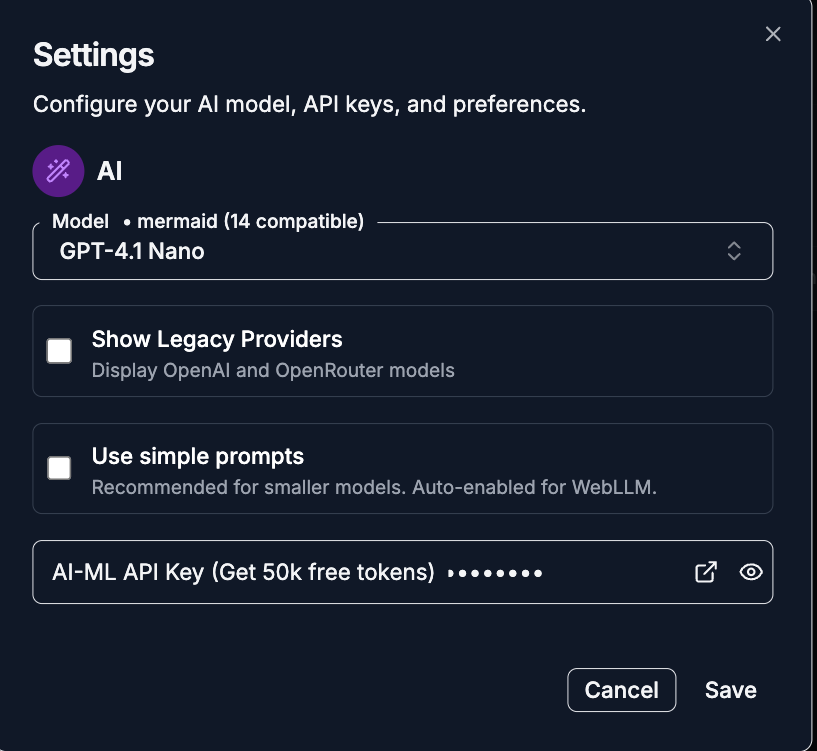
- Add API key and save
.png)
- Click the AI Chat button (located lower left)
.png)
AI Writing Generation Examples:
- "Write a professional resume summary for a software engineer with 5 years experience"
- "Create a cover letter for marketing manager position at tech startup"
- "Generate introduction paragraph for research paper on machine learning applications"
- "Write business proposal executive summary for CRM software implementation"
- "Create academic abstract for psychology study on social media impact"
AI Writing Enhancement Examples:
- "Improve this paragraph's clarity and professional tone"
- "Make this text more persuasive for business proposal"
- "Convert this casual email to formal business communication"
- "Enhance academic writing style for research paper"
- "Optimize resume bullet points for ATS keywords"
AI Notepad Templates - Resumes, Cover Letters, Research Papers
Resume Template
Open Resume Template in AI Notepad
Professional resume creation with AI optimization:
Resume Structure with AI Guidance:
[Your Name]
[Contact Information]

PROFESSIONAL SUMMARY
[AI-enhanced summary highlighting key achievements and skills]

EXPERIENCE
[Company Name] | [Position] | [Dates]
- [AI-optimized bullet points showcasing accomplishments]
- [Quantified achievements with impact metrics]
- [Skills demonstration with relevant keywords]

EDUCATION
[Degree] | [Institution] | [Date]
[Relevant coursework, honors, achievements]

SKILLS
[Technical skills, certifications, languages]
[Organized by relevance to target position]
AI Resume Enhancement Features:
- Keyword optimization for applicant tracking systems (ATS)
- Achievement quantification with metrics and results
- Industry-specific language matching job requirements
- Professional tone appropriate for target industry
- Format optimization for readability and impact
Cover Letter Template
Open Cover Letter Template in AI Notepad
Personalized cover letter creation with AI assistance:
Cover Letter Structure:
[Date]
[Hiring Manager Name]
[Company Name]
[Address]

Dear [Hiring Manager/Name],

Opening Paragraph:
[AI-crafted introduction mentioning specific position and company]
[Brief statement of qualifications and interest]

Body Paragraphs:
[Specific examples of relevant experience and achievements]
[Connection between your skills and company needs]
[Demonstration of company knowledge and cultural fit]

Closing Paragraph:
[Professional closing with next steps and contact information]
[Appropriate sign-off]

Sincerely,
[Your Name]
AI Cover Letter Features:
- Personalization assistance for company-specific content
- Tone optimization matching company culture
- Achievement highlighting relevant to position requirements
- Professional language appropriate for industry standards
Research Paper Template
Open Research Paper Template in AI Notepad
Academic writing with LaTeX support and scholarly formatting:
Research Paper Structure:
Title: [Clear, descriptive research title]
Abstract: [Concise summary of research objectives, methods, and findings]

1. Introduction
   [Research context, problem statement, objectives]
   [Literature review and theoretical framework]

2. Methodology
   [Research design, data collection, analysis methods]
   [LaTeX support for mathematical formulas and equations]

3. Results
   [Data presentation with tables and figures]
   $$Statistical\ Analysis: \chi^2 = \sum \frac{(O_i - E_i)^2}{E_i}$$

4. Discussion
   [Interpretation of results, implications, limitations]

5. Conclusion
   [Summary of findings, contributions, future research]

References
[Properly formatted citations in academic style]
Business Proposal Template
Open Business Proposal Template in AI Notepad
Professional business document creation:
Business Proposal Framework:
Executive Summary
[AI-optimized overview of proposal highlights]

Problem Statement
[Clear identification of business challenge or opportunity]

Proposed Solution
[Detailed solution description with benefits and advantages]

Implementation Plan
[Timeline, resources, milestones with specific deliverables]

Budget and ROI
[Cost breakdown and expected return on investment]

Conclusion
[Summary and next steps for decision-making]
AI Business Writing Features:
- Professional language appropriate for business audience
- Persuasive structure optimized for decision-making
- Data presentation with clear formatting and emphasis
- Executive summary highlighting key value propositions
Related AI Writing and Productivity Tools
Complete Tool Collections
Browse by Category:
- Online Productivity Tools - Complete writing and productivity toolkit
- Online Data Tools - Research and analysis tools for academic writing
- Online Compare Tools - Document comparison and version control
- Online Code Tools - Technical writing and documentation environment
Resources
- Essential Online Utilities Checklist for Developers 2025 - Complete productivity workflow
- Top 9 Browser-Based Utilities for Daily Tasks: 2025 Complete Guide - Daily productivity optimization
- IEEE Style Guide - Technical and academic writing standards
- APA Style Guidelines - Psychology and social sciences writing conventions
- MLA Style Manual - Literature and humanities academic writing
- LaTeX Documentation - Mathematical and scientific notation standards
Discover More: Visit tools-online.app to explore our complete suite of AI-powered writing and productivity tools.
Start Writing with AI Assistance Now
Stop struggling with blank pages. Write professional documents with intelligent grammar checking, style optimization, and LaTeX support—100% free with templates and PDF export. No downloads required.