
Cron Expression Generator Free Online - Crontab Generator & Schedule Builder 2026

Table of Contents
Free Online Cron Expression Generator - Visual Schedule Builder
Free online cron expression generators eliminate the complexity of manual cron syntax creation by providing visual interfaces for building scheduled tasks.
The Cron Expression Generator on tools-online.app provides comprehensive schedule building with intelligent features designed for DevOps and system administration workflows.
What are Cron Expressions?
Cron expressions are time-based scheduling patterns used to automate task execution on Unix-like operating systems, CI/CD platforms, and cloud services. A cron expression consists of five fields representing minute, hour, day of month, month, and day of week, allowing precise control over when automated tasks run.
Standard Cron Expression Format:
┌───────── minute (0-59)
│ ┌─────── hour (0-23)
│ │ ┌───── day of month (1-31)
│ │ │ ┌─── month (1-12)
│ │ │ │ ┌─ day of week (0-7, where 0 and 7 = Sunday)
│ │ │ │ │
* * * * *
Example Cron Expressions:
0 0 * * *- Every day at midnight0 9 * * 1-5- Every weekday at 9 AM*/15 * * * *- Every 15 minutes0 2 1 * *- First day of every month at 2 AM
Modern cron generators support all standard cron formats including Linux/Unix systems, CI/CD platforms, and cloud automation services. Advanced features include template libraries for common scheduling patterns, real-time error detection, and integration capabilities for DevOps workflows.
Core cron generator capabilities:
- Visual schedule building: Point-and-click interface replacing manual syntax
- Instant translation: Human-readable descriptions of timing patterns
- Execution preview: Next 10 run times with precise scheduling verification
- Error validation: Real-time syntax checking and conflict detection
- Template library: Pre-built schedules for common automation tasks
- Export integration: Direct compatibility with CI/CD and automation platforms
Online cron generators are essential for DevOps engineers, system administrators, and developers managing automated tasks, scheduled maintenance, and CI/CD pipeline triggers across development and production environments.
Benefits of Online Cron Generator vs Manual Syntax
Online cron generators provide significant advantages over manual expression creation, especially for teams managing complex automation schedules and users new to cron syntax.
Why Use Cron Expressions?
Cron expressions are essential for modern IT operations and development workflows:
Automated Task Management:
- Eliminate manual intervention - Tasks execute automatically without human oversight
- Ensure consistency - Scheduled operations run at exact intervals regardless of staff availability
- Reduce human error - Automated execution prevents missed tasks and scheduling mistakes
- 24/7 operations - Systems can perform maintenance and updates during off-hours
Why Use Online Cron Generators Over Manual Creation?
Ease of Use & Accessibility:
- Visual interface - Intuitive dropdowns and selectors replace syntax memorization
- No syntax knowledge required - Generate expressions without learning cron format rules
- Instant validation - Real-time error checking prevents deployment failures
- Human-readable output - Clear descriptions of when jobs will execute
Problems with Manual Cron Creation
Traditional cron syntax challenges:
- Complex syntax - Memorizing field positions, special characters, and ranges
- Calculation errors - Manual timing calculations leading to wrong schedules
- Testing difficulties - No easy way to verify execution times without deployment
- Documentation gaps - Cryptic expressions difficult for team understanding
- Platform variations - Different cron implementations with subtle syntax differences
According to DevOps automation research, visual automation tools reduce configuration errors by 75% while improving deployment speed by 50%.
- Integration capabilities with existing DevOps toolchains
For related automation timing, see World Time Zone Converter for global schedule coordination.
Cron Generator Features - Templates, Preview & Error Detection
The Cron Expression Generator on tools-online.app provides comprehensive schedule building with intelligent features designed for DevOps and system administration workflows.
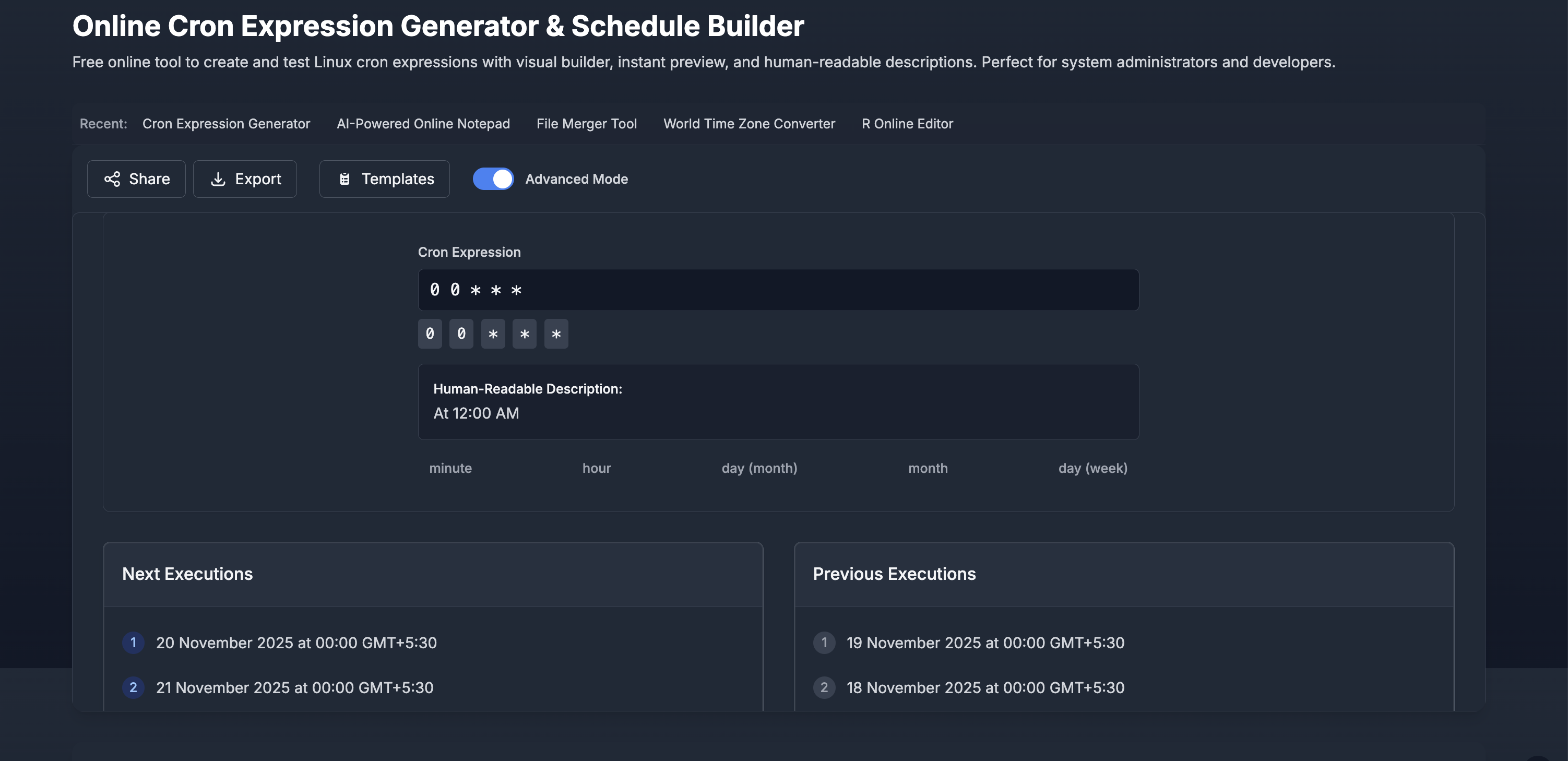
Intuitive Interface Components:
- Time field selectors for minute, hour, day, month, and day-of-week
- Range selection tools for complex scheduling patterns
- Special value options including wildcards, ranges, and step values
- Advanced mode toggle for expert users requiring complex expressions
- Real-time expression display showing generated cron syntax
Pre-built Schedule Templates:
System Maintenance:
- Daily Backup - Runs every day at midnight (0 0 * * *)
- Weekly System Cleanup - Runs every Sunday at 2 AM (0 2 * * 0)
- Monthly Maintenance - Runs on the 1st of every month (0 0 1 * *)
Business Operations:
- Weekly Report Generation - Runs every Monday at 9 AM (0 9 * * 1)
- Business Hours Operations - Runs hourly 9 AM-5 PM, Monday-Friday (0 9-17 * * 1-5)
Development & CI/CD:
- Nightly Build - Runs every day at 3 AM for automated builds
- Weekly Deployment - Runs every Friday at 6 PM for staging deployments
- Database Backup - Runs every 6 hours for critical data protection
Step-by-Step Guide
Use Visual Schedule Builder
Step 1: Visit tools-online.app/tools/cron
Step 2: Configure your schedule using visual selectors
- Minute field: Select specific minute(s) or use wildcard (*)
- Hour field: Choose hour(s) or range for execution time
- Day field: Set specific days of month or use wildcards
- Month field: Select months for yearly patterns
- Day of week: Choose weekdays for weekly patterns
Step 3: Review generated expression and description
- View cron syntax in standard format
- Read human-readable explanation
- Verify schedule matches intended timing
Step 4: Preview execution times
- Check "Next Executions" section for upcoming runs
- Confirm timing patterns are correct
- Adjust selectors if modifications needed
Step 5: Export or share your cron expression
- Use Export button for CI/CD integration
- Copy expression to clipboard for manual use
- Generate share link for team collaboration
Method 2: Start with Templates
Step 1: Click Templates button in the cron generator
Step 2: Choose appropriate template category:
- System Maintenance - Daily backup, weekly cleanup, monthly tasks
- Business Operations - Report generation, business hours automation
- Development - Build automation, deployment scheduling, testing cycles
Step 3: Select specific template
- Daily Backup: Every day at midnight
- Weekly Report Generation: Every Monday at 9 AM
- Monthly Maintenance: 1st day of every month
- Business Hours Operations: Hourly during work hours (9 AM-5 PM, Mon-Fri)
- Weekly System Cleanup: Every Sunday at 2 AM
Step 4: Customize template if needed
- Modify timing fields to match specific requirements
- Adjust days, hours, or intervals as necessary
- Maintain template structure for reliability
Step 5: Verify and implement schedule
- Review execution preview for accuracy
- Export to target platform or system
- Document schedule for team reference
Method 3: Advanced Mode for Complex Schedules
Step 1: Enable Advanced Mode toggle for expert features
Step 2: Create complex expressions using advanced syntax
- Step values: */15 for every 15 minutes
- Ranges: 9-17 for 9 AM to 5 PM
- Lists: 1,15 for 1st and 15th of month
- Combinations: Mix different patterns for complex timing
Step 3: Example complex schedules
*/15 9-17 * * 1-5  # Every 15 minutes during business hours, weekdays only
0 */6 * * *        # Every 6 hours, daily
0 0 1,15 * *       # Twice monthly: 1st and 15th at midnight
30 2 * * 0         # Weekly: Every Sunday at 2:30 AM
Step 4: Validate complex expressions
- Use error detection for syntax verification
- Review execution preview for pattern confirmation
- Test with small intervals before production deployment
Fixing Common Cron Expression Errors
Understanding proper cron syntax helps resolve typical scheduling issues when creating automated tasks. Here's how to identify and fix frequent cron expression problems:
Proper Cron Expression Format
Valid cron expressions follow this structure:
┌───────── minute (0-59)
│ ┌─────── hour (0-23)
│ │ ┌───── day of month (1-31)
│ │ │ ┌─── month (1-12)
│ │ │ │ ┌─ day of week (0-7, where 0 and 7 = Sunday)
│ │ │ │ │
* * * * *
Common Error Types and Solutions
1. Invalid Field Values
❌ Incorrect: Out of range values
70 25 32 13 8 # Minutes=70, Hours=25, Day=32, Month=13, Weekday=8✅ Correct: Within valid ranges
0 23 31 12 7 # Minutes=0, Hours=23, Day=31, Month=12, Weekday=7 (Sunday)2. Wrong Step Value Syntax
❌ Incorrect: Invalid step notation
*15 * * * *     # Missing forward slash
*/0 * * * *     # Cannot step by zero
*/65 * * * *    # Step value exceeds field range
✅ Correct: Proper step syntax
*/15 * * * *    # Every 15 minutes
*/5 * * * *     # Every 5 minutes
0-59/10 * * * * # Every 10 minutes starting from 0
3. Conflicting Day Specifications
❌ Incorrect: Both day-of-month and day-of-week specified
0 0 15 * 1 # 15th of month AND every Monday (conflicting)✅ Correct: Use either day-of-month OR day-of-week
0 0 15 * *      # 15th of every month
0 0 * * 1       # Every Monday
4. Impossible Date Combinations
❌ Incorrect: Dates that don't exist
0 0 31 2 *      # February 31st (impossible)
0 0 30 2 *      # February 30th (impossible)
✅ Correct: Valid date combinations
0 0 28 2 *      # February 28th (safe for all years)
0 0 L 2 *       # Last day of February (if supported)
5. Incorrect Range Syntax
❌ Incorrect: Wrong range formatting
0 9:17 * * *    # Wrong separator (should be hyphen)
0 17-9 * * *    # End time before start time
0 9-25 * * *    # End value exceeds valid range
✅ Correct: Proper range syntax
0 9-17 * * *    # 9 AM to 5 PM
0 0-6,18-23 * * * # Midnight to 6 AM and 6 PM to 11 PM
6. Missing Required Fields
❌ Incorrect: Incomplete expressions
0 0 * *         # Missing day-of-week field
*/15            # Missing hour, day, month, weekday fields
✅ Correct: All five fields specified
0 0 * * *       # Daily at midnight
*/15 * * * *    # Every 15 minutes
Debugging Tips
- Use visual builder to avoid manual syntax errors
- Check execution preview to verify intended timing
- Test with templates for reliable, proven patterns
- Validate ranges ensure values are within field limits
- Review platform documentation for system-specific cron variations
Cron Expression Templates - Backup, Maintenance & Automation
Daily Automation Templates
Open Daily Backup Template below in Cron Generator
Daily task automation for system maintenance and data protection:
Daily Backup Schedule:
# Daily Backup - Runs every day at midnight
0 0 * * *
Description: Executes daily backup procedures at midnight when system usage is minimal
Business Day Operations:
# Weekday Morning Startup - Runs Monday-Friday at 8 AM
0 8 * * 1-5
Description: Automated system startup and preparation for business operations

# End of Business Day - Runs Monday-Friday at 6 PM
0 18 * * 1-5
Description: Daily report generation and system maintenance routines
System Health Monitoring:
# Hourly Health Check - Every hour during business hours
0 9-17 * * 1-5
Description: System monitoring and health checks during operational hours

# Daily Log Rotation - Every day at 11:59 PM
59 23 * * *
Description: Log file rotation and cleanup before midnight backup
Weekly Automation Templates
Open Weekly Report Template below in Cron Generator
Weekly task scheduling for reports, maintenance, and system updates:
Weekly Report Generation:
# Monday Morning Reports - Every Monday at 9 AM
0 9 * * 1
Description: Generate weekly business reports and analytics

# Friday Deployment Window - Every Friday at 6 PM
0 18 * * 5
Description: Weekly deployment window for staging environment updates
System Maintenance:
# Weekly System Cleanup - Every Sunday at 2 AM
0 2 * * 0
Description: System cleanup, temporary file removal, and performance optimization

# Mid-week Database Maintenance - Every Wednesday at 3 AM
0 3 * * 3
Description: Database optimization, index rebuilding, and statistics updates
Monthly Automation Templates
Open Monthly Maintenance Template below in Cron Generator
Monthly task scheduling for comprehensive maintenance and reporting:
Monthly Maintenance:
# First of Month - Runs on 1st day of every month at midnight
0 0 1 * *
Description: Comprehensive monthly maintenance and system updates

# Mid-month Check - Runs on 15th of every month at 2 AM
0 2 15 * *
Description: Mid-month system health assessment and preventive maintenance
Financial and Business Cycles:
# Month-end Processing - Last day of month at 11 PM
0 23 L * *
Description: Month-end financial processing and report generation (if L is supported)

# Quarterly Reports - First day of quarter at 6 AM
0 6 1 1,4,7,10 *
Description: Quarterly business reports and analysis (Jan, Apr, Jul, Oct)
Development & CI/CD Templates
Open CI/CD Pipeline Template below in Cron Generator
Development automation and continuous integration scheduling:
Build Automation:
# Nightly Build - Every day at 3 AM
0 3 * * *
Description: Automated nightly build and testing for development branches

# Multiple Daily Builds - Every 4 hours during business days
0 */4 * * 1-5
Description: Regular builds during active development periods
Testing and Quality Assurance:
# Weekly Integration Tests - Every Saturday at 1 AM
0 1 * * 6
Description: Comprehensive integration testing on weekend low-usage periods

# Daily Security Scans - Every day at 4 AM
0 4 * * *
Description: Automated security vulnerability scans and compliance checks
Business Hours Operations Templates
Open Business Hours Template in Cron Generator
Scheduling tasks during operational hours for user-facing systems:
Hourly Business Operations:
# Business Hours Monitoring - Every hour, 9 AM-5 PM, Monday-Friday
0 9-17 * * 1-5
Description: Active monitoring and maintenance during business hours

# Customer Report Processing - Every 2 hours during business days
0 */2 * * 1-5
Description: Regular customer report generation and distribution
High-Frequency Operations:
# Every 15 Minutes During Business Hours
*/15 9-17 * * 1-5
Description: High-frequency data processing and synchronization

# Every 30 Minutes, Weekdays Only
*/30 * * * 1-5
Description: Regular system synchronization and data updates
Cron Scheduling Best Practices for DevOps
1. Plan Schedules Around System Resources
Why: Prevents resource conflicts and ensures reliable task execution
Best Practice:
- Stagger backup times to avoid concurrent high I/O operations
- Schedule intensive tasks during low-usage periods (nights, weekends)
- Distribute regular jobs across different minutes/hours to balance load
- Consider timezone implications for global systems and teams
Resource-Conscious Scheduling:
# Good: Staggered backups
0 1 * * * # Database backup at 1 AM
0 2 * * * # File system backup at 2 AM
0 3 * * * # Log archive at 3 AM

# Avoid: Concurrent resource-heavy tasks
0 2 * * * # Multiple backups at same time = resource conflict
2. Use Descriptive Documentation
Why: Enables team collaboration and troubleshooting
Implementation:
- Add comments explaining the purpose of each cron job
- Document dependencies between related scheduled tasks
- Include contact information for job owners and stakeholders
- Maintain schedule inventory with business impact descriptions
Documentation Template:
# Weekly Database Backup
# Purpose: Full database backup for disaster recovery
# Owner: DevOps Team (devops@company.com)
# Dependencies: Database must be in maintenance mode
# Business Impact: Critical - Required for data protection compliance
0 2 * * 0
3. Implement Monitoring and Alerting
Why: Ensures task execution and enables rapid incident response
Monitoring Strategy:
- Log execution results with timestamps and success/failure status
- Set up alerts for failed executions or missed schedules
- Track execution duration to identify performance degradation
- Monitor resource usage during scheduled task execution
Alert Configuration Examples:
# Critical alerts for backup failures
# Business hour alerts for customer-facing operations
# Performance alerts for long-running maintenance tasks
4. Test Schedules in Non-Production Environments
Why: Validates timing, resource usage, and dependencies before production
Testing Approach:
- Verify cron syntax using generators and validation tools
- Test execution timing with preview functionality
- Validate resource requirements in staging environments
- Check dependencies and integration points
Testing Checklist:
- Expression syntax validation
- Execution time verification
- Resource usage assessment
- Dependency confirmation
- Rollback procedure testing
5. Use Templates for Consistency
Why: Reduces errors and standardizes scheduling patterns
Template Benefits:
- Proven timing patterns reduce scheduling mistakes
- Consistent documentation improves team understanding
- Standardized resource usage prevents conflicts
- Easier maintenance with predictable scheduling patterns
Standard Template Categories:
- System maintenance (backups, cleanup, updates)
- Business operations (reports, processing, monitoring)
- Development workflows (builds, tests, deployments)
- Security operations (scans, audits, compliance checks)
6. Plan for Timezone Considerations
Why: Ensures proper scheduling for global teams and distributed systems
Timezone Best Practices:
- Use UTC for server operations to avoid daylight saving time issues
- Document local time equivalents for team understanding
- Consider business hours in different geographic regions
- Plan maintenance windows during global low-usage periods
Timezone Planning:
# UTC scheduling for global consistency
0 6 * * * # 6 AM UTC = Various local times globally

# Business-aware scheduling
0 22 * * 0 # Sunday 10 PM UTC = Monday morning in Asia-Pacific
7. Implement Proper Error Handling
Why: Enables graceful failure recovery and system reliability
Error Handling Strategies:
- Script-level error handling with proper exit codes
- Retry mechanisms for transient failures
- Notification systems for persistent failures
- Fallback procedures for critical operations
Error Handling Framework:
- Exit code standards (0=success, non-zero=failure)
- Logging with severity levels (INFO, WARN, ERROR, CRITICAL)
- Alert escalation based on failure count and impact
- Manual intervention triggers for critical failures
8. Regular Schedule Review and Optimization
Why: Maintains efficiency and adapts to changing requirements
Review Process:
- Monthly schedule audits for relevance and efficiency
- Performance analysis of execution times and resource usage
- Business requirement changes affecting scheduling needs
- Cleanup of obsolete jobs to reduce system overhead
Optimization Areas:
Schedule Efficiency Review:
✓ Remove unused or obsolete cron jobs
✓ Consolidate similar tasks for better resource utilization
✓ Adjust timing based on actual usage patterns
✓ Update documentation for schedule changes
✓ Verify alert configurations and escalation procedures
Related DevOps Automation and Productivity Tools
Complete Tool Collections
Browse by Category:
- Online Productivity Tools - Complete DevOps workflow optimization
- Online Data Tools - Database and data processing automation
- Online Code Tools - Development and automation environments
- Online Compare Tools - Configuration and code change tracking
Educational Resources
- Essential Online Utilities Checklist for Developers 2025 - Complete DevOps toolkit
- Top 9 Browser-Based Utilities for Daily Tasks: 2025 Complete Guide - Daily automation workflows
- IEEE POSIX Cron Standard - Official cron expression specification
- Linux Cron Documentation - System-level cron job management
- DevOps Automation Best Practices - Industry automation standards
- CI/CD Pipeline Documentation - Platform-specific scheduling integration
Discover More: Visit tools-online.app to explore our complete suite of DevOps automation and productivity tools.
Start Creating Cron Expressions Now
Stop memorizing complex cron syntax. Build scheduled tasks with visual interface, instant preview, and error detection—100% free with templates and CI/CD integration. No downloads required.