
Free World Time Zone Converter - Meeting Planner & Visual Timeline

Table of Contents
Free World Time Zone Converter - Online Visual Timeline & Meeting Planner
Online time zone converters eliminate the complexity of manual timezone calculations by providing visual timelines that display multiple zones simultaneously. These browser-based tools show business hours, DST transitions, and optimal meeting windows for distributed teams.
The world has 38 standard time zones ranging from UTC-12 to UTC+14, with additional variations for Daylight Saving Time (DST) observed in many regions seasonally.
Standard Time Zone Format:
GMT/UTC Offset: ±HH:MM
Example: GMT+5:30 (India Standard Time)
         GMT-5:00 (Eastern Standard Time)
         GMT+0:00 (Greenwich Mean Time)
Compare Time Zones Online: Step-by-Step Guide
Step 1: Access the Time Zone Converter
Visit tools-online.app/tools/timezone and open the converter interface in another tab.
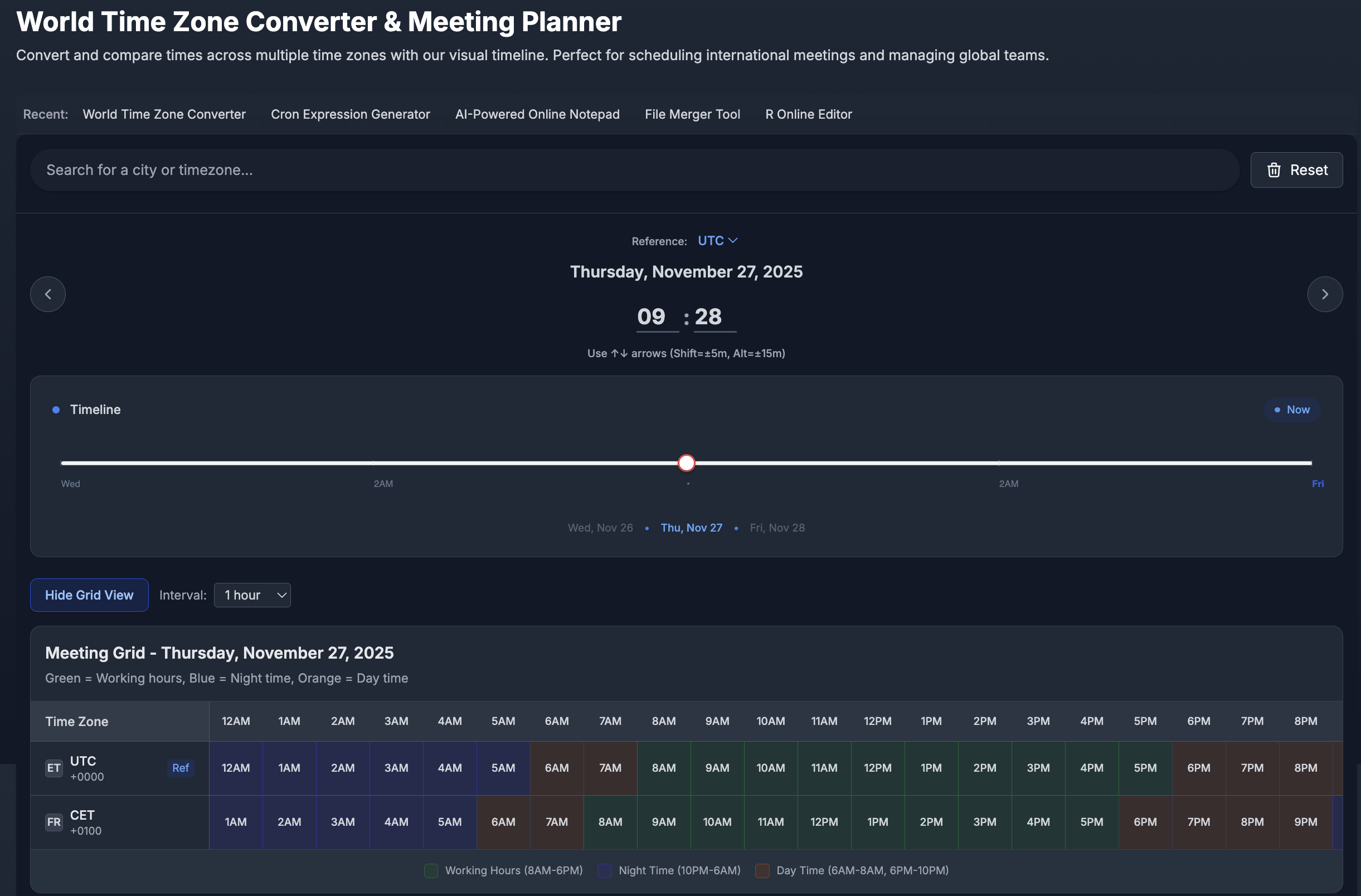
Dashboard Overview:
- Search bar at top for finding cities or timezones
- Recent tools quick-access navigation
- Timeline view showing current time across zones
- Meeting grid toggle for detailed planning view
Step 2: Add Your First Time Zone
Using the Search Bar:
- Type your city name (e.g., "Calcutta", "New York", "London")
- Or enter timezone abbreviation (e.g., "EST", "IST", "GMT")
- Select from auto-complete suggestions organized by region
Region Organization:
- ETC - Coordinated Universal Time zones
- EUROPE - European cities (CET, GMT, etc.)
- AMERICA - Americas timezones (EST, PST, CST)
- ASIA - Asian cities (IST, JST, etc.)
- AFRICA, AUSTRALIA, PACIFIC - Other regions
Automatic Detection:
The tool automatically detects your local timezone and displays it as a reference point with "Ref" indicator.
Step 3: Add Team Member Locations
Multiple Zone Comparison:
- Search and add 2-10 timezones for your distributed team
- Each zone appears as a card showing:
- City/region name with country code
- Current time in large display
- UTC offset (e.g., UTC +01:00 or GMT+5:30)
- Date reference
Example Setup:
CET (France/Paris)     - UTC +01:00 - 8:50 AM
Calcutta (India)       - GMT+5:30   - 1:20 PM
CST (US/Chicago)       - UTC -06:00 - 6:50 AM
Step 4: Use Visual Timeline for Planning
Interactive Timeline Features:
- Drag slider to explore different times across the day
- Arrow keys (↑↓) for 5-minute increments
- Shift + Arrows for 5-minute precise adjustments
- Alt + Arrows for 15-minute jumps
- Now button to instantly return to current time
- Date navigation showing Thu, Nov 20 • Fri, Nov 21 • Sat, Nov 22
24-Hour Timeline Bar:
Each timezone card displays a color-coded timeline showing:
- Green section - Working Hours (8AM-6PM)
- Blue section - Night Time (10PM-6AM)
- Orange section - Day Time (6AM-8AM, 6PM-10PM)
Step 5: Enable Meeting Grid View
Click "Show Grid View" button to see detailed hourly breakdown.
Meeting Grid Display:
- Rows: Each timezone you've added
- Columns: Hours from 12AM through 8PM in 1-hour intervals
- Color coding: Same as timeline (Green/Blue/Orange)
- Interval options: Choose 10/15/20/30/60 minute views
Finding Optimal Meeting Times:
- Scan grid for columns where ALL zones show green (working hours)
- Identify overlapping business hours across team
- Avoid blue sections (night time) to respect sleep schedules
- Use orange (day time) only if necessary for urgent meetings
Example Grid Analysis:
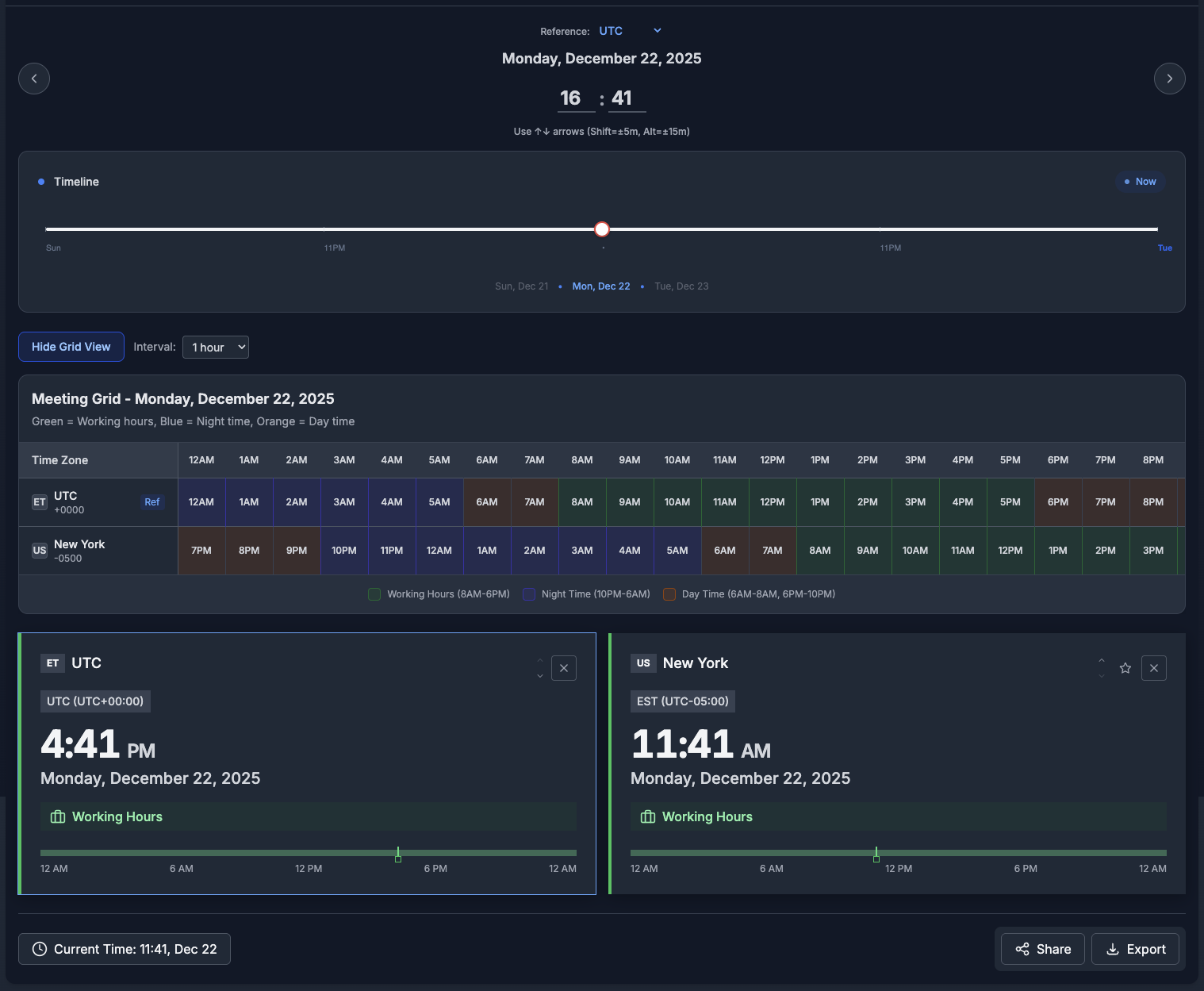
Step 6: Share or Export Configuration
Collaboration Features:
- Share button generates permanent link to your timezone setup
- Export button downloads configuration for calendar integration
- Copy URL to share with team members for consistent reference
Use Cases:
- Send link in team chat for meeting coordination
- Include in email signatures for timezone reference
- Embed in project documentation
- Save for recurring weekly planning
Online Time Zone Convertor
Convert between major time zones instantly with our online converter. Each link opens the converter pre-configured with your selected timezone pair for immediate comparison.
- EST to PST Converter - New York to Los Angeles time (3-hour difference)
- PST to GMT Converter - Los Angeles to London time (8-hour difference)
- GMT to IST Converter - London to India time (5.5-hour difference)
- IST to JST Converter - India to Tokyo time (3.5-hour difference)
- JST to UTC Converter - Tokyo to Sydney time (2-hour difference)
Need a different timezone combination? Follow the step-by-step guide above to compare any cities or timezones worldwide. Simply search for your locations and view them side-by-side with the visual timeline and meeting grid planner.
Related Productivity and Team Collaboration Tools
Complete Tool Collections
Browse by Category:
- Online Productivity Tools - Complete remote work optimization
- Online Code Tools - Developer collaboration across timezones
- Online Data Tools - Data processing for global teams
Complementary Productivity Tools
On tools-online.app:
- Cron Expression Generator - Schedule automated tasks considering timezone differences
- AI Notepad - Document meeting notes and share across teams
- File Merger - Combine reports from global offices
Educational Resources
- Essential Online Utilities Checklist for Developers 2025 - Remote work toolkit
- Top 9 Browser-Based Utilities for Daily Tasks: 2025 Complete Guide - Daily productivity workflows
Discover More: Visit tools-online.app to explore our complete suite of remote team collaboration and productivity tools.
Start Comparing Time Zones Now
Stop calculating timezone differences manually. Compare multiple zones with visual timeline, business hours display, and meeting grid planner—100% free with DST detection and share features. No downloads required.